Duovra for Windows

Two agents. One conversation.

Claude Code and OpenAI Codex in one Windows app. Choose an agent and model for each message and keep working in the same thread.

Version 1.0.11 · Windows x64 · Sign in to Claude Code or the Codex CLI before use. Release notes

Claude Code Codex

Switch agents, stay in the same conversation.

Claude Code and Codex can reply in the same thread. You choose who responds to each message.

The thread shows Claude Code’s progress updates, with its reads, edits, and tests grouped in an expandable summary.

The agent you choose receives the recent thread context. Duovra 1.0.11 recreated with sample data.

Workbench

See what the agent did, alongside your project.

Workbench sums up each turn, shows changes with their diff, and the project with its Git status, beside the conversation.

Open Workbench

The contextual panel opens alongside the conversation.

Workbench in Duovra 1.0.11 recreated with sample data.

Tools beyond the chat.

Tools for longer sessions with two agents, all in the same thread.

Git Worktrees

Work on several branches of the same repository in parallel. Each conversation lives in its worktree, and Claude Code, Codex, Workbench, and the queue work in that folder. Before removing one, Duovra checks for uncommitted changes, ignored files such as .env, and commits found on no other branch.

Live Preview

Open your dev server inside Workbench. Inspect elements, take captures, check the console and network, try screen sizes, and send what you pick to the agent as context. The page loads isolated, in a private profile with no access to Duovra.

Task queue

While your agent works, the send button adds your next task to the queue. With an empty composer, it cancels the run. After a restart, review interrupted tasks before picking up where you left off.

Permissions in the thread

Choose from the composer how much Claude Code or Codex can do in each conversation. Requests appear in the thread, so you review the command or file before approving it.

Previews

Preview Mermaid diagrams, static HTML and SVG, and supported declarative widgets in Workbench.

Activity, usage, and limits

See usage per turn and plan limits as reported by the CLI tools.

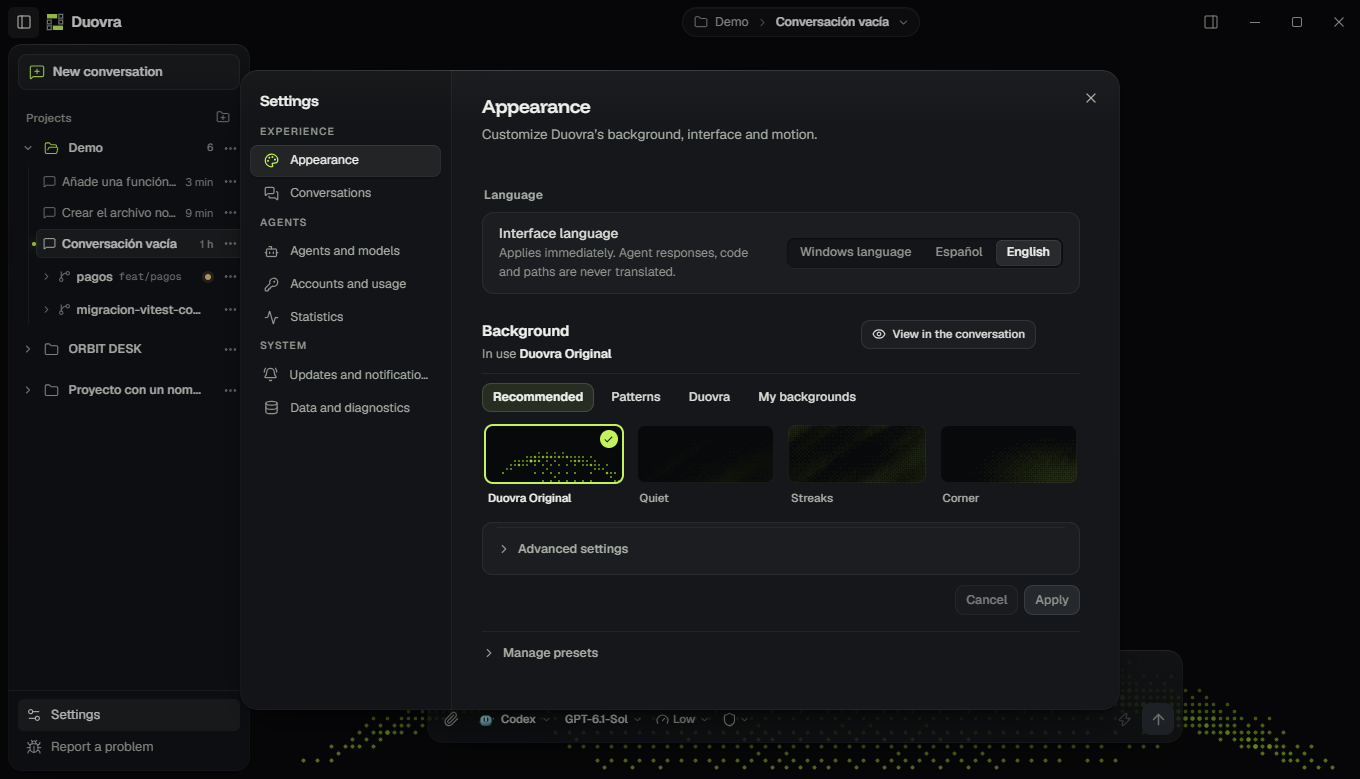
Duovra Appearance settings showing the interface language selector and the Duovra Original, Quiet, Streaks, and Corner background presets.

Appearance

Choose a background pattern or a local image, and an accent color that applies to every built-in background. Adjust motion or turn it off entirely. Agent mascots react as each turn progresses.

Screenshot of Duovra with the interface in English.

What’s new in 1.0.11 · Agent Experience

  • Shared context and memory. Switch between Claude Code and Codex without repeating history: decisions and constraints live in memories you can see and edit. Compact the native session on request without deleting visible chat history.
  • Fork, edit, and pick up again. Branch from any message, edit and regenerate as new branches, and import or export conversations. The original stays intact.
  • Plan before you build. Choose Build or Plan, review versioned plans, answer questions in the chat, and hand an approved plan to the other agent.
  • Control every run. Commands with /, a queue, persistent goals, code review, and interrupt and continue; steering where the provider supports it. Activity Center shows which conversations are working or waiting for a decision.

Your accounts, your data. Duovra runs the official Claude Code and Codex CLI tools with your existing logins. Projects, conversations, and settings are stored in SQLite in your Windows profile.

Duovra for Windows.

Free and open source. Install Duovra, open your project folder, and start with the agent you prefer.

Windows x64 installer (.exe). You can also download the portable ZIP or read the release notes.

If Duovra is already installed, check for the signed update in Settings → Updates and notifications. Installation and update guide.

System
Windows 11 x64 with Microsoft Edge WebView2 Evergreen Runtime.
Agents
Install Claude Code, Codex, or both, and sign in before getting started.
License
MIT. Model usage is billed according to your plan with each provider.

Independent. Free. Open-source.

Let’s build the future of Duovra together.

Duovra is built independently, driven by a passion for creating a better AI-powered coding experience. Your support helps maintain the project, develop new features, and keep Duovra free and open-source for everyone.

Prefer to support for free? A star on GitHub makes a difference too.

Star on GitHub(opens in a new tab)

Always free. Always open-source.